
Operation guide
Manager loop
TaskManager schedules tasks from the tasks table. One manager can schedule tasks for
multiple executors and even for multiple applications.
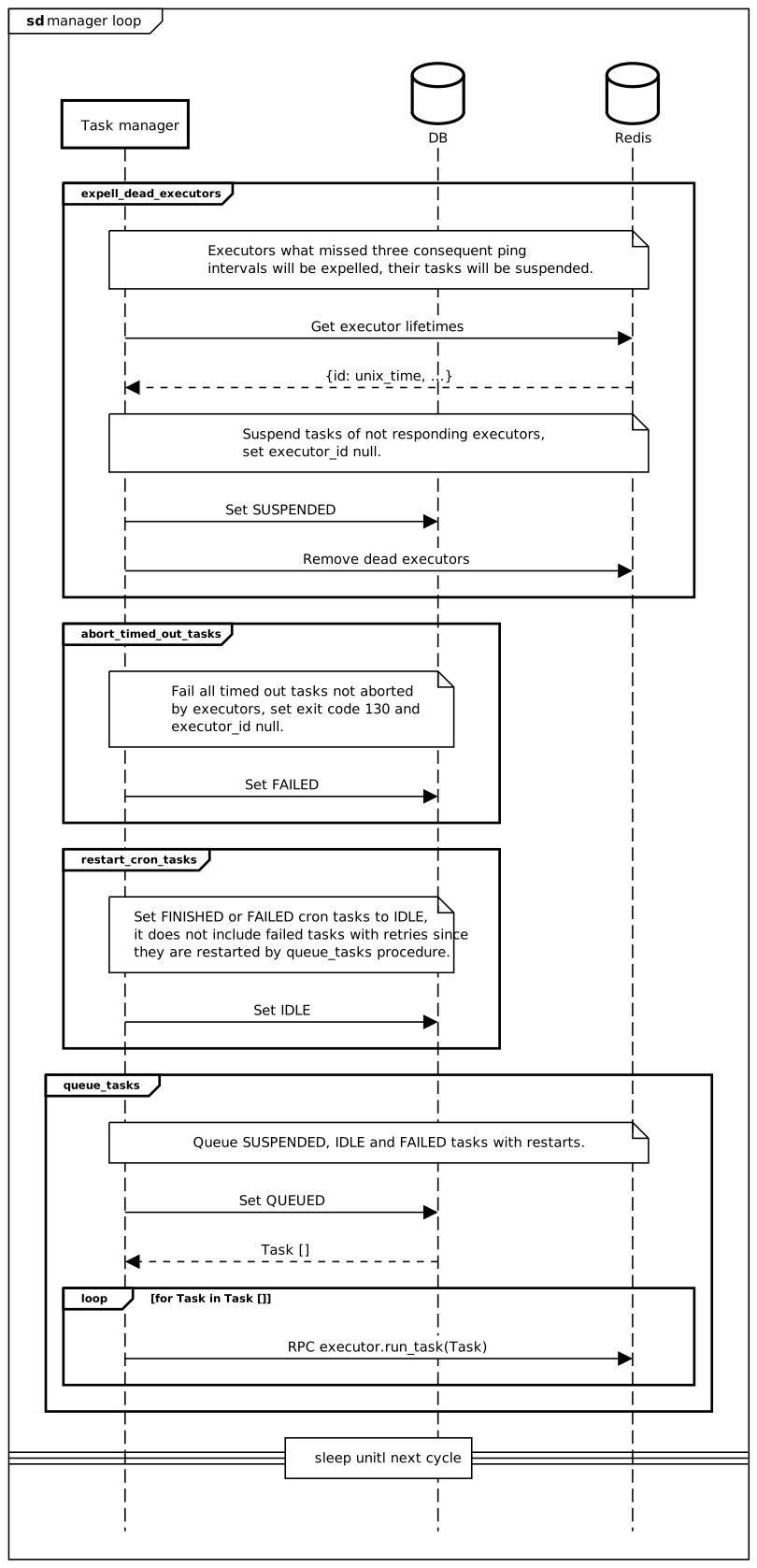
The core element of the process is loop(). At each cycle of the loop several
things happen.
Task manager will check all executors and expell dead ones (see Executor state monitoring).
QUEUEDorEXECUTEDtasks which reached timeout but has not been cancelled by their executors are set toFAILEDwithTask.exit_code 130.SUSPENDEDtasks will be queued and sent back to executor streams.IDLEtasks withTask.next_run < now() will be set toQUEUEDand sent to executors as well.FAILEDtasks with available retries will be queued and their retry counter will be incremented.
For a full list of task states see TaskStatus. See the diagram
for details.
Task execution
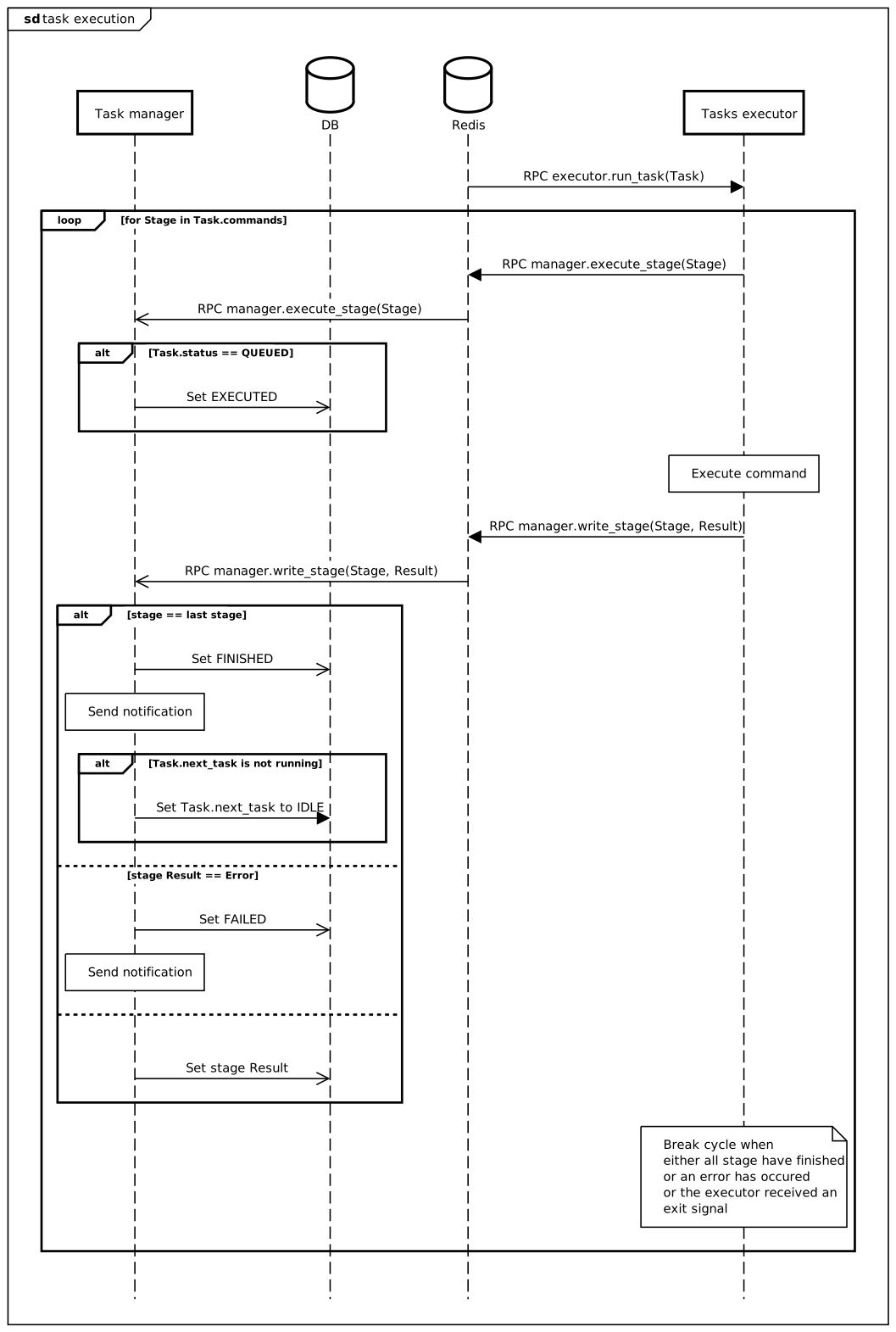
A queued task is sent to the executor stream as a run_task() RPC
command. The namespace of the stream is determined by the app_name attribute of the task. Any executor pulling
from this stream will execute a run_task command.
The task is executed stage by stage consequently. At each stage an RPC message is sent to
execute_stage() to tell that the stage is being executed.
Then TaskExecutor performs the stage command using its own internal RPC server.
At the end of each stage the stage result is sent to
write_stage() method.
There is a possibility that the executor will receive a SIGTERM while executing a task. In such case it will
suspend itself and all of its tasks by suspend_executor() command.
Executor state monitoring
TaskManager monitors executor state using ping messages from executors. An
active executor sends ping to ping() through RPC stream. If a particular
executor doesn’t ping for too long, all of the tasks assigned to this executor will be moved into
SUSPENDED state by the manager (and rescheduled in the next cycle).
If the supposedly dead executor somehow will be able to send results for these tasks, such results
will be ignored by the manager. Ping intervals and executor lifetime limits are described
in Limit.
Configuration
The executor-manager system is stream-based and does not require direct HTTP connections. You can use multiple executor apps and instances with a single or multiple managers. However since there is no real-time urgency in executing service tasks, it would be reasonable to configure a single manager instance and just restart it on failure.
A simplified minimal config for an executor is shown below. Basically it requires a working RPC server and a stream listener connected to a specific topic. You don’t need to configure task or notification interface for an executor. You also should provide manager_topic name to the executor to send data to the manager.
If you’d like to configure a single manager for multiple applications you should also provide manager_namespace specifying a manager app name (otherwise the executor’s app namespace will be used).
- cls: RedisStreamRPCClient
- cls: RedisListener  # executor stream
  name: redis_stream.executor
  enabled: "[services_tasks_executor_enabled]"
  settings:
    group_id: "[main_name]"
    topic: executor
    max_batch_size: 10
    max_parallel_batches: 1
    scope: SYSTEM
- cls: TaskExecutor  # user task executor
  enabled: "[services_tasks_executor_enabled]"
A manager would require database access as well as notification and task interfaces.
- cls: NotificationService
- cls: RedisStreamRPCClient
- cls: RedisListener  # manager stream
  name: redis_stream.manager
  enabled: "[services_tasks_manager_enabled]"
  settings:
    group_id: "[main_name]"
    topic: manager
    scope: SYSTEM
- cls: TaskManager  # user task manager
  enabled: "[services_tasks_manager_enabled]"
In this configuration my_app executor would listen to dev.my_app.executor stream and will send to
dev.manager_app.manager stream, and the manager will listen to dev.manager_app.manager and send tasks to
dev.<specified_app>.executor streams depending on Task.app_name value.