
User guide
Creating tasks
The best way to manage tasks is by using TaskService.
Each new task must have commands with a list of JSONRPC request body templates
(see TaskCommand).
Each request in the list of commands is considered a stage. The stages will be executed consequently.
The result of each stage is sent back to the manager and stored in the task result field.
Maximum number of commands per task is regulated by MAX_STAGES.
from kaiju_tasks import Task, TaskCommand, TaskService

# TaskService
task = await task_service.create(Task(
    app=self.app.name,
    id='orders.delete_expired',
    commands=[
        TaskCommand(method='orders.delete', params={'conditions': {'expired': True}}),
        TaskCommand(method='cache.clear', params=None)
    ]
))
It is recommended
to manage parameters using kws and templates, see Sharing data between stages
for more info.
It’s reasonable to include app_name to tell the manager which app would run this task.
You can access current app name using self.app.name from inside your service.
It’s also reasonable to manually set id when creating a periodic or triggered task
so it will be easier to manipulate it in the table. The id can be any string.
See task_schema and Task for the complete list of attributes.
Task status
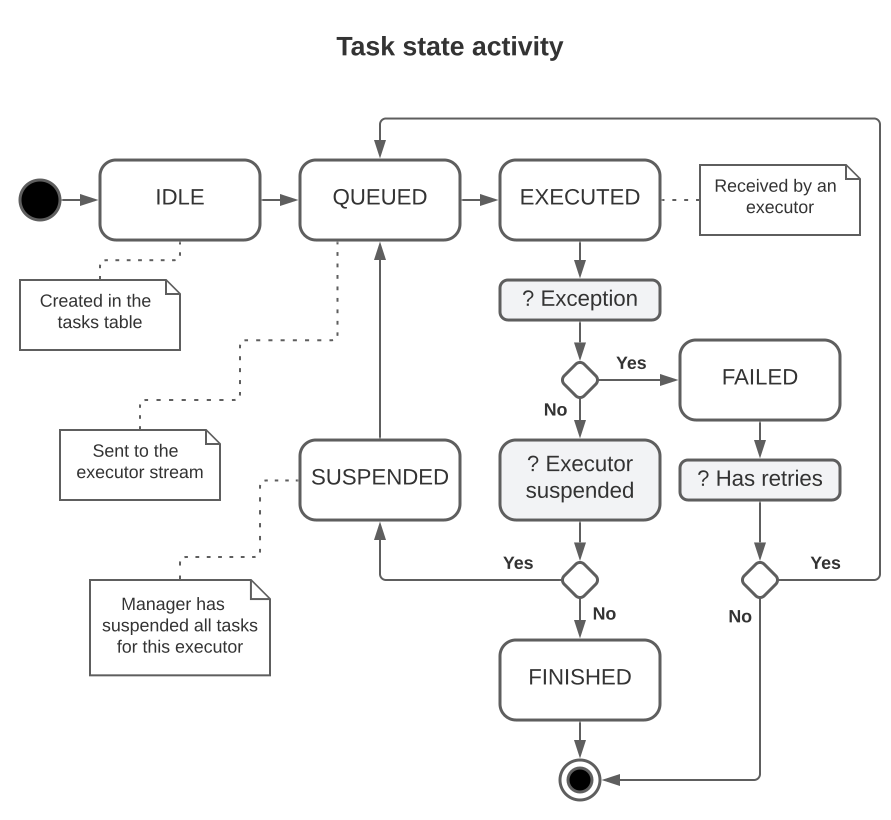
Each task has its state stored in status field of the tasks table.
All new tasks are created in IDLE state.
Before sending a task into the stream, the manager switches its status to QUEUED.
When an executor callbacks the task id to the manager the task is switched to EXECUTED
acknowledging the fact that it is now in process. Eventually it becomes
FINISHED / FAILED depending on the result.
Failed tasks can be restarted (see Retries).
Finished tasks can be restarted too if they have run intervals configured (see Periodic tasks).
Occasionally a task may become SUSPENDED. It means that the executor
who was running the task is exited or not responding. The manager will automatically try to re-queue such tasks as soon as possible.
See TaskStatus for a list of task states.
Timeouts
Each task has an assigned max_exec_timeout which determines a total timeout
in seconds for all task stages.
The timeout interval is calculated from the queued_at (queue time)
and the resulting deadline is stored in exec_deadline.
When a task reaches its timeout it is automatically aborted in the executor spawning a TimeoutError.
Note
It’s recommended to configure timeouts for each task manually depending on how much theoretically it may take to complete. Note however that an internal RPC server of the executor may have max_timeout value lower than the one tou have set for the task.
Defaults for timeouts are DEFAULT_T and MIN_T,
MAX_T.
Additionally each command supports its own timeout using optional max_timeout argument.
TaskCommand(method='do.job', params={'a': 1, 'b': 2}, max_timeout=100)
Note
Timeouts for each command does not override task total timeout. The task will be aborted when the task deadline is reached even if a command can technically be executed.
Retries
To allow retries yoe can set max_retries. When a task with retries fails, it will be
re-queued as soon as possible and retries counter will be incremented
until no retries left or the task has succeeded.
You can set a stage the task should be restarted using restart_policy
which can be one of:
CURRENT - default, restart from the current stage, or
FIRST - discard the results and restart from the first stage.
The absolute limit on number of retries is regulated by MAX_RETRIES.
task = await task_service.create(Task(
    id='server.sync',
    commands=[{'method': 'server.sync'}],
    max_retries=3,
    restart_policy='CURRENT'  # CURRENT or FIRST
))
Periodic tasks
Use cron field to execute tasks periodically.
See cron format for more details.
task = await task_service.create(Task(
    id='cache.update'
    commands=[TaskCommand(method='cache.update')],
    cron='* * * * 1'
))
Note
Sometimes a task manager will not schedule cron tasks at precise intervals. The reasons may be: task takes too much
time between iterations (considering that max_exec_timeout allows that),
the task was restarted, etc. This could lead to the actual intervals being larger than specified in the cron settings.
Conditions
You can specify a condition for a single command using Condition syntax. The command will be executed if the condition result against task template data is True. Otherwise an executor will skip the execution and write None to the command result. Note that from the executor/manager perspective a skipped stage is still considered ‘executed’ but with no actual command submitted to the RPC.
from kaiju_tools.templates import Condition

task = await task_service.create(Task(
  app=self.app.name, id='products.update_prices',
  commands=[
      # suppose it returns a 'count' of actually updated items
      TaskCommand(method='products.update_attributes'), # -> {'count': 1000}
      # this command will be executed only if the previous stage 'count' > 0
      TaskCommand(
        method='products_cache.refresh',
        condition=Condition({'0.count': {'gt': 0}})
      )
  ]
))
You can create even more complicated syntax using templates (see Sharing data between stages).
task = await task_service.create(Task(
  app=self.app.name, id='products.update_prices',
  commands=[
      # suppose you have 'update_threshold'- min number of updated rows required for a cache refresh
      TaskCommand(method='settings.get'),  # -> {..., 'cache': {'update_threshold': 42, ...}}
       # suppose it returns 'count' of actually updated items
      TaskCommand(method='products.update_attributes'),  # -> {'count': 1000}
      # refresh cache only if updated item 'count' > 'update_threshold'
      TaskCommand(
        method='products_cache.refresh',
        condition=Condition({'1.count': {'gt': '[0.cache.update_threshold]'}})
      )
  ]
))
Timers
Imagine you have two sequential commands the first of them requiring additional grace time. To do this you can insert a
Timer between them with a timeout specified in seconds. The task will
become WAITING with the executor being able to process other tasks.
Once the timer has been reached, the task will be queued from the next stage (similarly to suspended tasks).
See an example below.
from kaiju_tasks import Timer, Task

task = await task_service.create(Task(
  app=self.app.name, id='orders.delete_expired',
  commands=[
      TaskCommand(method='orders.delete', params={'conditions': {'expired': True}}),
      Timer(100),
      TaskCommand(method='cache.clear', params=None)
  ]
))
Note
Timers do not shield tasks from cancellation once the task max timeout is reached. You should estimate possible
durations of your tasks and specify appropriate max_timeout values to prevent it.
Messages (hooks)
You can use Message command to specify that a task need user input (i.e. received message)
to continue. This command indicates that the executor must drop the task (which itself becomes
WAITING) and the task will not continue until it receives a message via
write_message(). Once a message is received the task will be queued again
with the message data available in stage results (under message stage index).
You can use it to wait for some intermediate data which would take too long to acquire, or when your task needs actual human input to continue.
See the example below.
from kaiju_tasks import Timer, Task

task = await task_service.create(Task(
  app=self.app.name,
  id='orders.delete_expired',
  commands=[
       # ask for a data report file
      TaskCommand(method='statistics.request_report', params={'callback_id': '[id]'}),
      # wait until TaskService.write_message receives a message for this task
      Message(max_timeout=None),
      # message will be available in the results
      TaskCommand(method='files.download', params={'url': '[1.url]'})
  ]
))
Example of a message:
POST /public/rpc
{
  "method": "tasks.write_message",
  "params": {
    "id": "my_task_id",
    "data": {"url": "http://statistics.example/reports/324934"}
  }
}
Note
Messages do not shield tasks from cancellation once the task max timeout is reached. You should estimate possible
durations of your tasks and specify appropriate max_timeout values to prevent it.
Results
Once a stage is completed, its result will be stored in result list.
An error is stored in Task.error.
There’s also exit_code - a exit code
where 0 means OK and everything else indicates an error. See ExitCode
for a list of used exit codes.
You may use TaskService to fetch task results and other data.
# TaskService
data = await task_service.get(
  id=my_task['id'],
  columns=['result', 'exit_code', 'error']
)
# exit_code != 0 means error, exit_code == None means that the task yet to be executed
Once a task is restarted (for any reason) its results and exit code are cleared and
a new job_id is assigned to the task. You can still access previous results
from the notifications table if you enabled notify.
See NotificationService and Notification
for details about notification attributes.
# NotificationService
# all results for the task sorted by date
await notifications.list(
  conditions={'task_id': task['id']},
  sort=[{'desc': 'created'}],
  columns=['result']
)
# a result for a particular job
data = await notifications.list(
  conditions={'task_id': task['id'], 'job_id': task['job_id']},
  columns=['result']
)
Chaining tasks
You can chain tasks by providing next_task parameter when adding a new task.
The value must be an id of an existing task. The referenced task will be scheduled for execution
once the main task has finished.
There are a few rules for task chaining:
The task must finish successfully. A failed task does not trigger the next one.
If the next task is already
QUEUED,EXECUTEDorSUSPENDEDit will not be re-scheduled.Disabled tasks are also not executed.
An example of task chaining is shown below.
next_task = await task_service.create(
  Task(commands=[
    TaskCommand(method='do.something.else')
  ])
)
task = await task_service.create(
  Task(commands=[
    TaskCommand(method='do.something')
  ], next_task=next_task['id'])
)
Permissions
Permission management for tasks and notifications includes checking current user id when user makes a request
to TaskService or NotificationService.
Unless a user has specific permission (see Permission)
one can view and edit only tasks and notifications with user_id equals to the current user id.
System users can access all tasks and notifications.
Resetting tasks
It’s unlikely that you would need to reset a task. However you can use
reset_task() (“tasks.reset” in RPC) to reset a particular task to its initial
state. The task then will be re-queued by the manager.
# TaskService
await task_service.reset(id='my_task_id')
POST {"method": "tasks.reset", "params": {"id": "my_task_id"}}
Log tracing
A new random job_id is assigned to a task when it’s QUEUED
(unless it was retried or suspended). This id is both written to the tasks table and sent as
a correlation id in related requests. It is also saved in job_id
for this task notifications. You can use this id to get the complete log for this task.